
How to Add CarPlay to Tesla Model 3, Model Y & Model S (2026)
Tesla has no native CarPlay support — and says it never will. But there is exactly one product that adds wireless CarPlay to your Tesla without modifying the car. Here’s everything you need to know.

Tesla’s large touchscreen is genuinely impressive — but it runs Tesla’s own software with no native CarPlay support. The Carlinkit T2C 2.0 changes that.
Why Tesla doesn’t support CarPlay
Tesla has never supported Apple CarPlay or Android Auto — on any model, in any year. The reason is deliberate: CarPlay requires Apple to have a degree of control over the infotainment interface, and Tesla has no interest in ceding that to any third party. Elon Musk has stated multiple times that CarPlay support is not coming to Tesla.
Tesla’s own software is genuinely capable — navigation, streaming, gaming, and over-the-air updates are all built in. But for iPhone users who rely on Waze, specific podcast apps, iMessage hands-free, or Siri, the absence of CarPlay is a real daily friction that Tesla’s software doesn’t fully replace.
The only compatible solution: Carlinkit T2C 2.0
The Carlinkit T2C 2.0 is the only dedicated wireless CarPlay adapter built specifically for Tesla. It’s engineered to work with Tesla’s unique USB architecture — which is fundamentally different from the factory CarPlay systems found in BMW, VW, Toyota, Honda, and other brands. This is why it’s the only product that works.
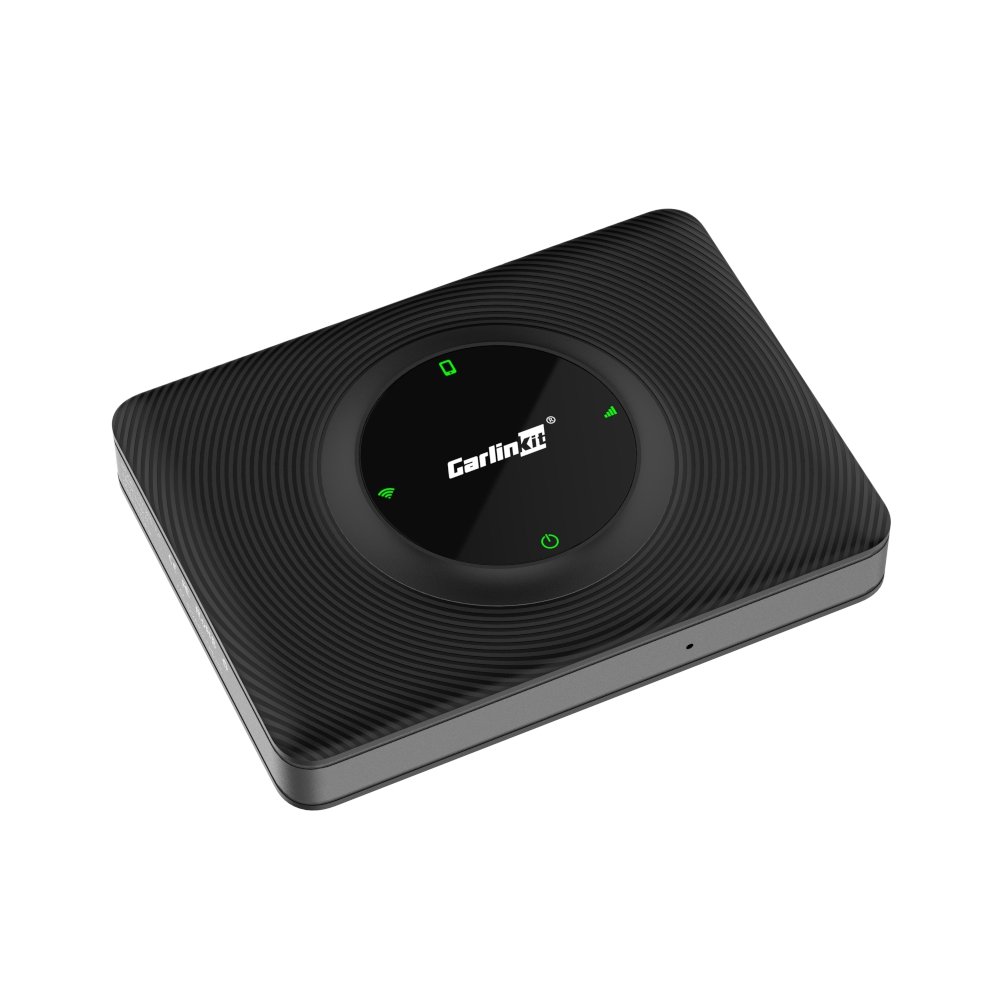
Purpose-built for Tesla Model 3, Model Y, Model S, and Model X. Plugs into Tesla’s USB port and adds wireless Apple CarPlay to your Tesla’s touchscreen — no permanent modification, no voided warranty, no drilling. The only product of its kind.
Tesla model compatibility
The Carlinkit T2C 2.0 is designed for the following Tesla models:
| Tesla Model | T2C 2.0 Compatible | Notes |
|---|---|---|
| Model 3 (all years) | ✓ Yes | USB-A port in centre console |
| Model Y (all years) | ✓ Yes | USB-A port in centre console |
| Model S (2017+) | ✓ Yes | 2021+ Refresh: verify USB-A availability |
| Model X (2017+) | ✓ Yes | Verify centre console USB-A port |
| Cybertruck | Check product page | Confirm compatibility before ordering |
Always verify your exact model year and trim on the T2C 2.0 product page before purchasing.
How the Carlinkit T2C 2.0 works
The T2C 2.0 plugs into Tesla’s USB-A port and acts as a bridge between your iPhone and Tesla’s touchscreen. Unlike adapters for conventional cars — which plug into a factory CarPlay USB interface — the T2C 2.0 uses a Tesla-compatible protocol to display CarPlay directly on your Tesla’s screen.
Your CarPlay apps, navigation, music, Siri, and iMessage all appear on Tesla’s large touchscreen — just as they would in any CarPlay-equipped car. You switch between Tesla’s native interface and CarPlay with a single tap. Both coexist — CarPlay doesn’t replace Tesla’s software, it runs alongside it.
Standard wireless CarPlay adapters require the car to have a built-in factory CarPlay USB interface to communicate with. Tesla’s USB architecture is fundamentally different — it has no CarPlay interface. The T2C 2.0 is specifically engineered to work with Tesla’s USB stack, which is why no other adapter is compatible.

The T2C 2.0 plugs into the USB-A port in Tesla’s centre console — no wiring, no modification, no dealer visit needed.
Step-by-step setup guide
Insert the Carlinkit T2C 2.0 into the USB-A port in your Tesla’s centre console. The device powers on automatically when the car is awake. It will appear in Tesla’s USB device list within a few seconds.
The T2C 2.0 launches its own interface on the Tesla touchscreen — access it via the app launcher or USB/media source depending on your Tesla software version. Tap the CarPlay icon within the interface.
On your iPhone, go to Settings → Bluetooth and connect to the T2C 2.0 device. Make sure Wi-Fi is also enabled. Once paired, CarPlay launches on the Tesla screen within 5–10 seconds.
After the initial pairing, the T2C 2.0 connects to your iPhone automatically whenever you get in the car. No manual steps — just get in, and CarPlay is ready within seconds of the car waking.
Important: regular CarPlay adapters don’t work on Tesla
All standard wireless CarPlay adapters — including our NCS 3-in-1 Box, the Carlinkit TBox Plus, and any adapter designed for BMW, VW, Toyota, Honda, Mercedes, or other brands — do not work on Tesla. They require a factory CarPlay USB interface that Tesla does not have. For Tesla, the Carlinkit T2C 2.0 is the only option.
Frequently asked questions
No — Tesla does not support CarPlay or Android Auto on any model. The Carlinkit T2C 2.0 is a purpose-built adapter that adds wireless CarPlay to Tesla vehicles through the USB port.
No. Standard wireless CarPlay adapters require a factory CarPlay USB interface, which Tesla does not have. Only the Carlinkit T2C 2.0 — engineered specifically for Tesla — is compatible with Model 3, Model Y, Model S, and Model X.
The T2C 2.0 supports Tesla Model 3, Model Y, Model S, and Model X. Always check the product page for your specific model year before purchasing.
The T2C 2.0 is a plug-in USB device that makes no permanent modifications to the vehicle. Using USB accessories does not void Tesla’s warranty. If you have any concerns, consult your Tesla service centre before purchasing.
Carlinkit releases regular OTA firmware updates for the T2C 2.0 to maintain compatibility with Tesla software updates. If you experience issues after a Tesla OTA update, check for a T2C 2.0 firmware update via the companion app first.